
A UPX-packed executable no longer looks like a Visual Basic program. Its entry point is the small decompressor UPX added, its sections are compressed, and the VB6 project header is gone. A VB6 decompiler reading those bytes as they are concludes, rightly, that there is no VB6 program in them.
VBReFormer Gen2 (V7) now opens these binaries like any other. It unpacks them on opening, without ever running them, then rebuilds the original PE structure before analysing it. Nothing to prepare: drop the file as it is.
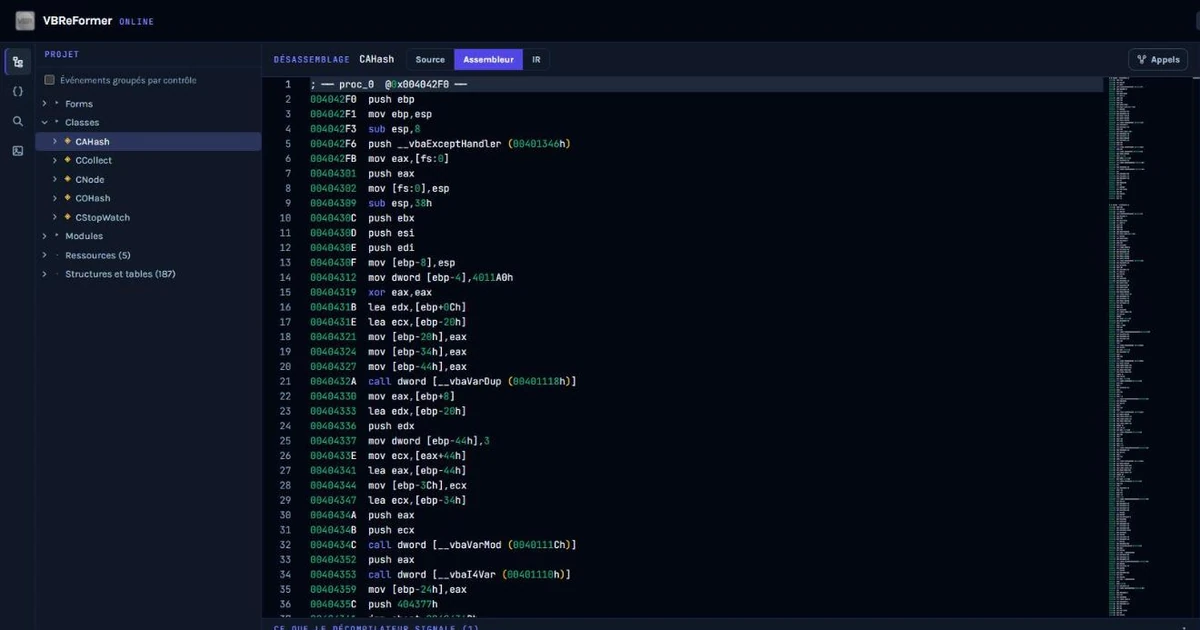
DemoNat.exe packed with UPX 5.2.1 (14 KB), opened in VBReFormer Online: the project is recovered and runtime calls (__vbaVarDup, __vbaVarMod) are named, proof that the import table was rebuilt.Unpacking without running
The usual way to get rid of UPX is to launch the program and let it unpack itself in memory, or to go through an external tool. On a binary of unknown origin, let alone malware, launching the program is not an option.
VBReFormer does all the work statically: UPX's decompressor is never executed, no process is started, nothing is emulated. The binary is read as data, unpacked, then analysed. That is the rule of the whole product: VBReFormer never runs what it analyses.
Unpacking happens when the binary is opened, once, and serves every view. It is bounded in size and time: a crafted file cannot decide how much memory or time its analysis takes.
Rebuilding the PE structure
Decompressing the sections is not enough: to be readable, the image has to become a consistent PE again, with its sections, headers and import table. That is what our measurement checks: the image rebuilt by VBReFormer is compared, byte for byte, with the one produced by upx -d, UPX's official tool.
| Measurement of 23 October 2026 | Result |
|---|---|
| Binaries packed with UPX 5.2.1 and 3.96 | 186 |
Images identical to upx -d | 178 |
| Images differing only by export timestamp | 8 (DLLs and OCXs) |
| Failures | 0 |
One thing UPX does not restore, even with upx -d: the import name table (OriginalFirstThunk) comes back empty. An ordinary PE reader then loses the whole list of imported functions, and with it the names of the calls into the MSVBVM60.DLL runtime. VBReFormer rebuilds that table before reading the binary. Calls become __vbaStrCat or __vbaVarDup again instead of anonymous addresses. The fix applies to every binary, including a file you already unpacked yourself with upx -d.
The engine also bounds the code section by the import directory, so the import data of an unpacked image is never mistaken for code.
The same project as the original
The proof that matters is the final output. On the 14 binaries of the automated test, the project exported from the packed version is identical, file by file and line by line, to the one exported from the original binary. Those 14 binaries cover native code and P-code, executables, ActiveX DLLs and OCX controls.
Same result on our largest witness, a 9.35 MB executable packed with LZMA: 57,049 project lines, identical to the original's.
| 9.35 MB witness | Unpacking time |
|---|---|
| NRV compression (UPX default) | 0.1 s |
| LZMA compression | 0.65 s |
In other words, unpacking is imperceptible next to the analysis itself.
One session, on the unpacked image
Once the binary is unpacked, the whole session works on the rebuilt image: source, disassembly, format map and binary patch. An address shown in one view is therefore the same in all the others. The file name and its hash remain those of the file you dropped: that is the one you are analysing.
For whom, and where
- Every edition, including without a licence. Unpacking happens when the binary is opened, before any licence check: the free preview benefits as much as paid licences.
- Desktop and online studio. Both go through the same analysis service. In VBReFormer Online, just drop the file.
- Native and P-code, EXE, DLL and OCX.
What VBReFormer says when it cannot
A binary recognised as UPX-packed that VBReFormer cannot unpack is analysed as it is, with a warning giving the reason. So you do not read "this is not a VB6 program" when the real answer is "this is a packed VB6 program I could not open".
Other packers and protectors are recognised and named on opening: ASPack, PECompact, MPRESS, FSG, MEW, Upack, NsPack, PEtite, Themida, VMProtect, Armadillo, ASProtect and Enigma. They are not unpacked yet, but you know what you are dealing with instead of a plain refusal.
After UPX come ASPack, MPRESS and PECompact, with the same built-in unpacking, without execution. Protectors such as Themida or VMProtect will remain recognised and named, but never executed: removing them would require running the binary, which VBReFormer does not do.
Why it matters
UPX is one of the most widespread packers, in legitimate software and malware alike. For code recovery, it is the old executable nobody remembered had been packed. For malware analysis, it is one of the first layers you meet on a Visual Basic 6 binary: we discussed it in Why malware campaigns are returning to Visual Basic 6. In both cases the answer is now the same: drop the file, VBReFormer handles the rest.
Try it
- VBReFormer Online: drop a VB5/VB6 executable, packed or not.
- Download the free edition for the desktop.
- VBReFormer V7: the rewritten engine